Tuesday, May 1, 2012
10 Factors That Makes a Popular Blog
There has been much discussion for the different ways a blog can be created and how to find out more topics but the most important factor is to find what makes a blog the most popular? This is the main question that we have today and we can try to find an answer for this after the discussion that we will be doing below.
Complete Knowledge of Subject: The person who is writing must have a good knowledge of blogging and he or she should be able to bring out the related articles after research. The research will find him a few articles regarding the topic but one need to find most relevant topic and then put in hard work to find interesting angles and then discuss them in the blog.
Topic of Subject: The factors of the subject must be chosen well so that the readers do get a tight discussion relating to the topic and get a concise and to the point topic discussion from the site. One should know all about the keywords and how to go about discussion a topic for these are a tough competition for new bloggers and one need to have strength in thinking to outperform the others.
Complete Grasp of Language: The person who is with the blogging world is here to perform in the literary circle and should have a lot of confidence on his ability to express the thought process over the pages clearly and precisely.
Regular Posting: The regular posting is most important and one must keep in mind that there should be regular posting for the sites. This is good proposition when one starts the work but slowly the regularity goes off and the subjects and posts are changed after a few days.
Change of thoughts from different angle: The blogger must bring out the difficult thoughts quite simply on the pages and must get the readers to understand the subject and the topics clearly.
Technical knowledge: The blogger must have enough technical knowledge for posting of blogs. The designing and the structure of the pages for the blogs need to be created. You will find different tools and they would be sufficient for working out the issue. You will be able to create platform for promotion from blogs.
Regular touch with the readers: You must keep a regular touch with the readers as they will suggest you different topics that you can discuss on. The likes and dislikes of the readers and the interest and hobbies all can be found out if you want to and then try to choose the subject accordingly.
Marketing strategy: The pay per click option for sales can be a good inclusion for people who feel good to buy things. The readers who will like to buy or at least know about the merchandise can be led to another page of your own site or to an external site for them to do shopping.
Keep fun sessions: You need to keep fun sessions for the blog readers. You need to find the passion of the readers and then you can keep a discussion on that topic. Some funny topics can also be a good respite after some serious discussions.
Create community of similar thinking people: The people with similar thinking can find each other in the pages of your blog and you can help them to create a community. These people will bring with them more subjects and other people with similar thought process who will have interest in reading your blog for the subject matters.
The blog pages are small fields where the people meet to read and comment on the blogs and these blogs can bring out different interest of the people. They will help in increasing the internet traffic and find more on the subject that is being discussed. You need to find more such factors to keep the readers coming back to your site.
Five Tips For Creating Professional LinkedIn Page
11:37 AM
LinkedIn, SEO, SEO Tips, Social Media
In case you would want to advertize your business, the first thing you would have to think about would be social media websites, owing to the fact that this marketing tool is one of the most influential ones. This would mean that you would have to gain knowledge on this particular topic, as it is not very easy to understand what social networking is all about. So, you have created a page on one of the leading social media sites, but what should you next? In order to be able to answer this, and take the right steps in this field, you need to familiarize yourself with social media websites.
The Most Popular Social Media Websites – LinkedIn
One of the most popular websites today is without a doubt LinkedIn. This social networking platform has millions of users, among which are both businesspeople and people who use the site for personal reasons. This site is one of the best ways for a great number of people to hear about your business, and here you’ll be able to share and show your expertise relating to your line of business.
Some Useful Tips on How to Create a Professional LinkedIn Page
In case you are new to LinkedIn, you might want to read on and see five of the most useful tips to help you create a professional LinkedIn page for your business.
Don’t Leave Any Blank Spaces: When creating a professional page for your business at LinkedIn, you should know that your business will benefit a lot if you fill in all the blanks. This means that you should provide the information about your skills and expertise. Also, you should have a profile picture, as a profile without a picture on any site tells a lot about the user. In many cases, profiles without a profile picture define users who don’t plan on staying on the site, or they are just creating spammy content.
Make Connections: The main purpose of any social website is to connect people, and LinkedIn is in no way different from its competitors. Here, you should also try to make connections with people who have joined this site. However, you should keep in mind that you shouldn’t go around the site trying to connect with everyone you spot. Rather than this, you should try to find people who are in the same line of business as you, and people you are generally interested in getting to know better.
You Are an Expert: This site is one big network of professionals, and you should know you are one of them. Try to give your potential clients and customers the reason to choose you.
Sync In – LinkedIn offers its users to sync their profiles with their Twitter account, and other useful sites. You should make use of this.
Realize the Importance of Groups: You will find a lot of groups on this site. There is a reason why they exist, and when you find the one that you feel you should join based on your line of business and interests – feel free to join it. This way you’ll get to approach your clients, show your expertise, and learn something new.
Try out these tips, as you’ll certainly benefit from them, but be prepared to learn a lot more things along the way, as creating a professional page on LinkedIn isn’t something you can just do. Instead it is a long learning process that will eventually show the desired results.
How To Remove An Image From Google Images
11:28 AM
Google, Google Images, Google Webmaster Tools, SEO Tips
If you want an image removed from Google's search results, it's important to bear a couple of points in mind.
- Google doesn't own the web, and can't remove content from the web.
- The images in Google’s search results are controlled by the webmasters of the sites that hosts those images.
If you don't own the site on which the image appears, you should ask the webmaster to remove the image or block it from search engines. How to contact a webmaster.
Once the webmaster has removed the image URL from the webmaster’s site or blocked it from being included in our index, our search results will automatically reflect the change after we next crawl the site. You can expedite this process using the URL removal tool.
To use the URL removal tool, you’ll need to know the exact URL of the image you want removed. Here’s how to find it:
- Click the image that you locate in the image search results.
- Right-click See full size image or Full size, and copy the link address.
- Paste the URL into a file or document, so it’s available when you use the URL removal tool.
Watch this video to learn how to remove an undesirable image from Google Images search results.
Top 10 Free Forms for Blogger & Websites
8:27 AM
Bloggers, Development, Facebook, Forms, Google Doc, Google Site, SEO, SEO Tools, Twitter, Websites, WordPress
If you are looking 'how to put a any form in a blogger' then this post is going to help you. Putting a form in blogger is very easy.
All you need to do just create a new post and put a form code (Provided by following sites below) in body section of your post and publish it. That's it.
There are various sites across the web which offers free forms to use for Blogger & Websites. Here I am going to share top 10 sites which offers free forms for Blogger & Websites with embedded code.
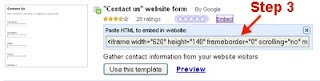
1. Google Docs
Google Docs provide embedded code forms for your blog or website. Just login to docs.google.com and click on the New > From Template > Forms. Choose form of your choice and copy embedded code. Follow steps mentioned below:
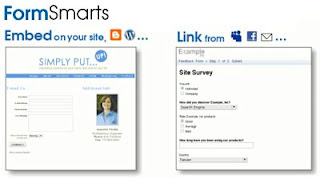
2. FormSmarts
FormSmarts is an integrated web form service that lets you create forms, publish them online, and get form results. Add a web form to your site or blog, or let visitors access your form from MySpace®, Facebook®, and anywhere you can post a link.
3. Kontactr
Kontactr is a one-click free contact form service. With Kontactr, you can fight against the amount of spam that you receive daily. Protect your email address by using our highly secure contact form. You can also use our simple tools to embed the form right into your own website.
4. Wufoo
Wufoo offers easy, copy/paste solutions for integrating a Wufoo form into a web page. For advanced users, full CSS and XHTML markup is also included. To simplify the process even further, the intuitive Wufoo theme manager allows you to customize the look of your form with a few clicks of the mouse so that your form seamlessly matches the look of your site.
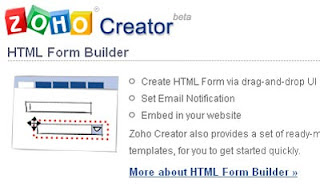
5. ZOHO
Zoho Creator provides you with an easy drag-and-drop html form builder to build html forms online. Zoho Creator also makes it easy to embed HTML Forms in your website through simple copy/paste. Once you have collected data through HTML Forms, you can manage and edit the collected data online and share the data with others
It is now easier than ever to keep in touch with your site's visitors. The arduous task of creating contact forms, email forms, feedback forms, questionnaires, surveys, order forms, polls, or any other type of web form is a thing of the past!
Script provided by this site works for a wide variety of website forms, not just contact us forms. These scripts are sometimes refered to as the following: contact form, website contact form, email form, PHP contact form, Javascript contact form, form to email, form 2 email, form2email, form generator, form builder, form maker, automatic contact form or contact form script.
8. FormSpring
FormSpring gives businesses and organizations an easy way to build any type of online form, integrate it with their website and begin collecting data. Once you have started collecting that data you can use the information you gathered in our online database or export it. With FormSpring anyone can build all types of web forms, collect data online and do it simply and efficiently.
WebFormDesigner can automatically validate your user's input - ensure the required fields are properly complete, and check that a valid email is input. Restrict input to alphanumeric, numerals only or just letters.
10. Kampyle
Customize the look and feel of your feedback forms to fit your website's, as well as your business needs. Create multiple feedback forms for different locations of your website with the relevant questions for each page.
Do you have any suggestions? Leave your comment.
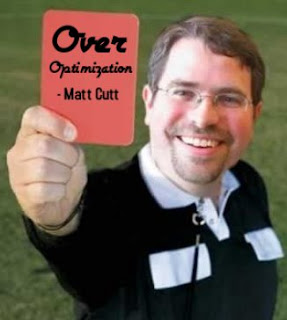
Google Over Optimization Penalty
5:11 AM
Google, Google Update, Matt Cutts, SEO, SEO Tips
Over Optimization has been the recent craze of those who were unfortunate enough to be hit by this Google algorithm change. It’s not an easy thing to deal with over optimization. So how do you get back on track once you’re hit by Google?
Black hat has gone a bit further
Over Optimization has just been added to the list of ‘don’t do’s’ by Google. I thought only black hat techniques were placed in this category but obviously now that is no longer the case. Even natural, white hat SEO now has a fine line that it cannot cross. That line is named just enough optimization.
Seriously, you can no longer be aggressive in your SEO to be good. Things are going to slow down from here on for Google to pass over your site and let your SEO grow.
The Factors Behind Over Optimization
Over Optimization is optimizing your website far beyond how it would be naturally done so in an off-page perspective. It is a content-quality check to enforce the Panda update.
The defining, common factor is an ‘if statement’. If your website does not have quality content AND:
- You have a lot of exact-match Anchor Text coming into your website – signaling unnatural link building
- You are practicing Obvious Link Exchange – link exchange pages already signal spam to Google. Setting up a link exchange page is a no-no. Right now, in-content link exchanges are the best way to go.
- Your website has a Fast Link Acquisition Rate – again, signaling unnatural link building
- Your Social Signals vs Links Ratio is far from each other – if there are a lot of links coming in, there should be people coming in from those links. If those links are quality, the people coming in from there should most likely engage in a social activity in your website. If your social signals are not consistent with your links, there must be something wrong.
“It’s widely believed that keyword stuffing and link exchanges are already spam signals in Google’s algorithm, so either Google intends to ratchet up the amount of penalty or dampening that those spam signals merit algorithmically or they have new over-optimization signals in mind as well,” - Matt Cutts
Perhaps Over Optimization can be simplified to optimizing your website for the search engines rather than for people.
The bottom line is, a site can only be considered over optimized if it is filled with SEO techniques – whether good or great, and the content does not live up to the site’s SEO level.
“All those people who have sort of been doing, for lack of a better word, “over optimization” or “overly” doing their SEO, compared to the people who are just making great content and trying to make a fantastic site, we want to sort of make that playing field a little bit more level.” – Matt Cutts
One thing’s for sure
If you have great, quality content that focuses on people and not search engines, you have nothing to worry about.
Here are 23 guidelines from Amit Singhal to ask yourself in verifying content that the Google Panda Update will consider ‘quality’
- Would you trust the information presented in this article?
- Is this article written by an expert or enthusiast who knows the topic well, or is it more shallow in nature?
- Does the site have duplicate, overlapping, or redundant articles on the same or similar topics with slightly different keyword variations?
- Would you be comfortable giving your credit card information to this site?
- Does this article have spelling, stylistic, or factual errors?
- Are the topics driven by genuine interests of readers of the site, or does the site generate content by attempting to guess what might rank well in search engines?
- Does the article provide original content or information, original reporting, original research, or original analysis?
- Does the page provide substantial value when compared to other pages in search results?
- How much quality control is done on content?
- Does the article describe both sides of a story?
- Is the site a recognized authority on its topic?
- Is the content mass-produced by or outsourced to a large number of creators, or spread across a large network of sites, so that individual pages or sites don’t get as much attention or care?
- Was the article edited well, or does it appear sloppy or hastily produced?
- For a health related query, would you trust information from this site?
- Would you recognize this site as an authoritative source when mentioned by name?
- Does this article provide a complete or comprehensive description of the topic?
- Does this article contain insightful analysis or interesting information that is beyond obvious?
- Is this the sort of page you’d want to bookmark, share with a friend, or recommend?
- Does this article have an excessive amount of ads that distract from or interfere with the main content?
- Would you expect to see this article in a printed magazine, encyclopedia or book?
- Are the articles short, unsubstantial, or otherwise lacking in helpful specifics?
- Are the pages produced with great care and attention to detail vs. less attention to detail?
- Would users complain when they see pages from this site?
6 Changes Every SEO Should Make Before the Over-Optimization Penalty Hits
2:04 AM
Google, Google Algorithm, Google Update, SEO, SEO Tips
Having overly optimized web pages could soon get your websites in some hot water with Google and their search results. It has recently been announced that Google will start to penalize websites that engage in over-optimization practices.
Here is some information and changes that you should be making to your SEO practices in order to avoid this type of penalization.
Subscribe to:
Comments (Atom)


.jpg)
.jpg)